Boost your video editing efficiency with the perfect left-hand device. Tame complex shortcuts and streamline your workflow effortlessly with these innovative tools.
Ever felt your video editing could be more efficient? Even with keyboard shortcuts and mouse maneuvers, the process can become overwhelming. Enter the left-hand device—the ultimate solution to streamline your editing tasks.
These devices allow for intuitive one-handed control over cut edits, zooms, and tool switches, significantly speeding up your workflow. For editors using shortcut-heavy software like Premiere Pro or DaVinci Resolve, these devices become indispensable allies in productivity.
This article covers everything from the basics of what a left-hand device is to how to choose the best one and recommended models tailored for video editors, all from a professional perspective.
OURTIME SERVICE About our own service
Thinking about an AI video? Talk to OurTime.
OurTime can make videos like the ones in this article for you.
Understanding Left-Hand Devices: What Are They and Why You Need One
A left-hand device is a supplementary input device designed for one-handed operation. It simplifies complex shortcuts, macros, and timeline operations, allowing for quick, intuitive execution.
For video editors, these devices can:
Assign frequently used commands like Cut (⌘+K / Ctrl+K)
Play/Pause (Space)
Zoom in/out on timelines
Switch tools (V / C, etc.)
By mapping these functions to a single knob or button, you can enhance both your speed and focus during editing sessions.
Essential Guide to Choosing the Right Left-Hand Device for Video Editing
Whether you're new to these devices or considering an upgrade, here are four key factors to ensure you make the right choice.
✅ 1. Compatibility with Your Editing Software
Ensure compatibility with your preferred editing software like Premiere Pro, After Effects, DaVinci Resolve, or Final Cut Pro. Devices with dedicated profiles or custom mapping features are easier to integrate.
✅ 2. Presence of Dials, Knobs, and Macros
Physical knobs and wheels significantly enhance usability for timeline zoom or playback position adjustments. Look for devices that allow multiple shortcut or macro assignments for versatile use.
✅ 3. Ergonomic Design and Size
Comfortable shapes that fit well in your hand are crucial for long sessions. Check for fatigue resistance, key layout comfort, and weight balance.
✅ 4. Price and Necessary Specifications Balance
Beginners to Part-Time Creators: Models under $100 offer ample performance.
Intermediate to Professional Users: High-performance models priced between $200-$600 are recommended.
Determine the right balance between price and functionality based on your specific needs.
Best Budget-Friendly Models for Beginners (Top 2 Picks)
Shortcut assignments compatible with various editing tools
Characteristics
Gaming-oriented yet excellent for editing
Price Range
Approx. $80
Recommended For
First-time left-hand device users
The Razer Tartarus V2, known for gaming, is also an excellent choice for video editors. With up to 32 keys customizable for shortcuts, it pairs perfectly with Premiere and After Effects. The unique mecha-membrane key switches provide excellent tactile feedback, ideal for long editing sessions. Easily customizable via dedicated software, this model offers remarkable freedom and usability under $100, making it a great introductory device for beginners.
6 LCD Keys, Macro Assignable, Supported by Dedicated App
Software Compatibility
OBS / Adobe Software / Final Cut, etc.
Characteristics
Visually intuitive and easy to adopt
Price Range
Approx. $90
Recommended For
Beginners interested in macro operations
The Stream Deck Mini features LCD keys that display images, making it easy to remember operations visually. By assigning macros and shortcuts to its six buttons, you can significantly enhance your efficiency in video editing and streaming. It integrates well with Adobe Premiere, OBS Studio, and Final Cut Pro, with intuitive settings via a dedicated app. Thanks to its user-friendly design and simplicity, it's an ideal first left-hand device.
Cost-effective, multifunctional device; usable by right-hand
Price Range
Approx. $120
Recommended For
Intermediate users and part-time creators
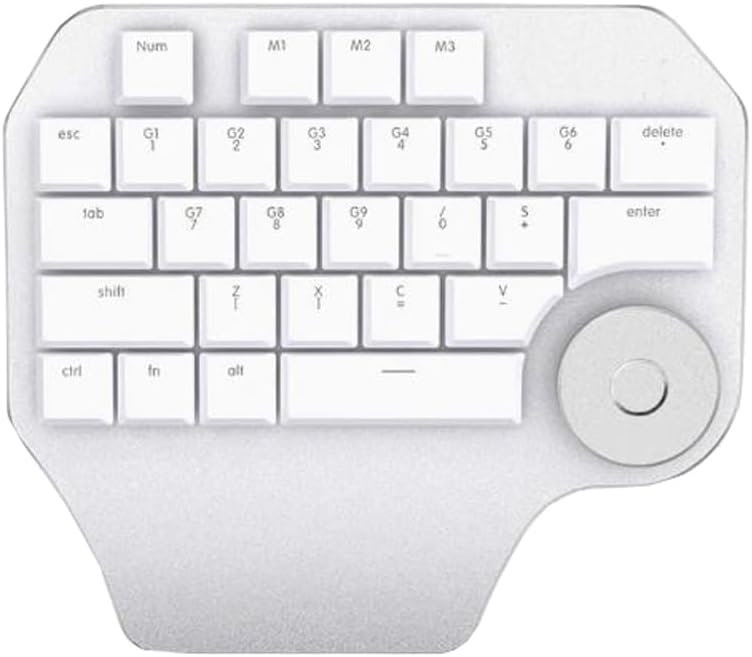
The Delux Designer T11 is a highly practical model featuring a rotary dial and 10 customizable keys, all for a reasonable price. Its button layout is ergonomically designed for comfort during long editing sessions. You can assign shortcuts to each key, significantly boosting efficiency when paired with major editing software like Premiere and Photoshop. Its unique design allows for right-hand operation, catering to left-handed users as well. It's perfect for intermediate users looking to set up a professional editing environment without breaking the bank.
Lightweight & compact, excellent operability for the price
Price Range
Approx. $90
Recommended For
Creators in space-constrained environments
The XPPen AC19 Shortcut Remote is an affordable, compact left-hand device that doesn't sacrifice functionality. Weighing just 70g, it's perfect for cramped desks and easy to transport. With 10 customizable buttons and a wheel, it excels in timeline zooming and scrolling operations. Quick setup via USB receiver makes it a breeze to use. Offering performance and convenience beyond its price, it’s a reliable choice for first-time left-hand device users.
Cost-effective version of Elite, with adjustable sensitivity
Price Range
Approx. $240
Recommended For
Intermediate users seeking value
The TourBox NEO inherits the functionality of its higher-end counterpart, the Elite, but at a more accessible price point. It offers detailed control with its knobs and wheels, making it ideal for precise operations with software like Premiere Pro and DaVinci Resolve. Customize shortcuts via dedicated software to suit your editing style. Its sensitivity adjustment and responsiveness make it perfect for intricate editing tasks. This device offers comparable performance to high-end models, making it an excellent choice for users seeking advanced features without the premium price.
Top Picks for Professionals: High-End Left-Hand Devices (Top 3 Picks)
Professional users engaged in serious video production
The TourBox Elite is highly regarded among professionals as an indispensable left-hand device. Its knobs, wheels, and various custom buttons allow for intuitive and precise shortcut operation, greatly enhancing editing efficiency. It's especially effective for timeline operations, color grading, and audio adjustments in software like Premiere Pro and DaVinci Resolve. With Bluetooth capability, it eliminates cable clutter, creating a sleek workspace. This product meets the precision and comfort needs of professional environments.
Content creators, streamers, photo and video editors
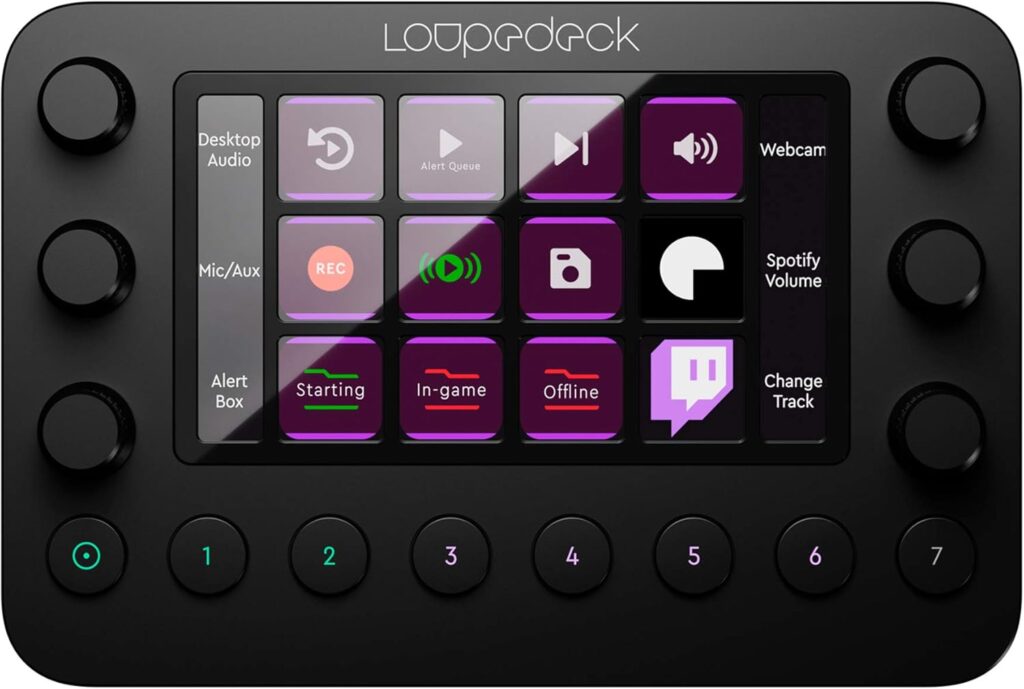
Loupedeck Live is a highly adaptable console designed specifically for live streaming, photo, and video editing tasks. Equipped with customizable buttons, rotary dials, and a vivid LED touchscreen, it provides creators with immediate and precise control over their workflows. Fully compatible with popular software such as Adobe Creative Cloud, OBS Studio, Final Cut Pro, and Twitch, Loupedeck Live simplifies complex tasks, allowing users to focus more on creativity. With its accessible price point and intuitive functionality, it is an ideal choice for streamers and editors seeking efficiency and customization in their setups.
Conclusion: Maximize Your Editing Efficiency with the Perfect Left-Hand Device
In video editing, efficiency is key to quality and sustainability. Each left-hand device we introduced can be a reliable partner in enhancing your editing workflow.
For beginners, start with budget-friendly models under $100.
For intermediates, choose models with a good balance of customization and cost.
For professionals, opt for high-end models with intuitive and precise features.
Selecting a device that suits your editing style and software will greatly improve your speed, focus, and comfort.
Use this guide to find the perfect left-hand device and elevate your editing experience to new heights.