Converting MP3 recordings into clear, readable text has never been easier. Whether you're transcribing interviews, lectures, or meetings, there are now AI tools that do it for you — quickly and accurately.
In this guide, we'll show you how to transcribe MP3 audio to text using both free and professional tools. We’ll also compare the best services available in 2025, including Notta, Otter.ai, and more.
What Is MP3 Transcription?
MP3 transcription refers to the process of converting audio files in MP3 format into written text. It's commonly used for:
Meeting notes
Podcast transcripts
Lecture summaries
Interview documentation
Instead of typing everything out manually, modern AI tools use voice recognition to transcribe your files automatically.
“Recording is just the first step. If you don’t convert it into text, you’re leaving value on the table. Transcribe it. Now.”
OURTIME SERVICE About our own service
Thinking about an AI video? Talk to OurTime.
OurTime can make videos like the ones in this article for you.
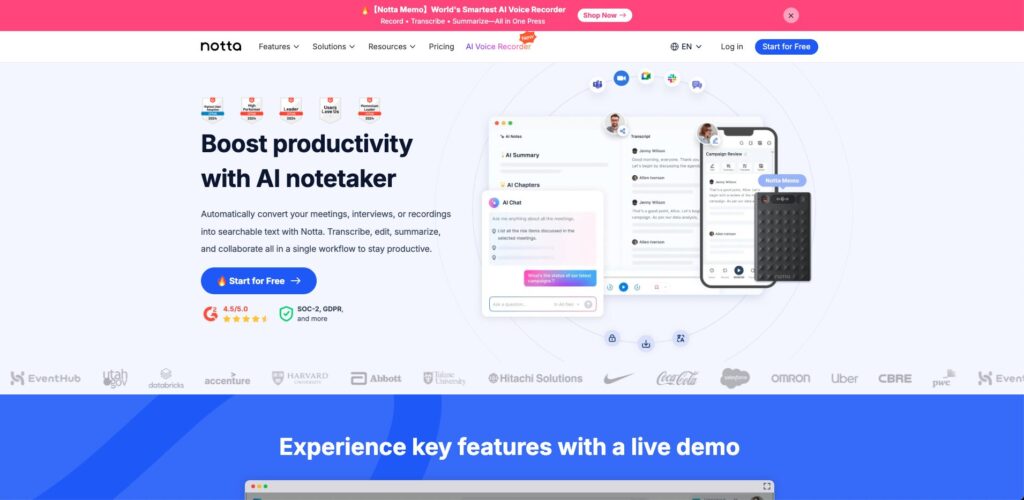
Why We Recommend It: Notta is one of the most accurate and beginner-friendly tools for transcribing MP3 files. It not only supports various formats but also includes smart features like speaker detection, auto punctuation, and AI summaries. The interface is clean, and it’s trusted by professionals across industries.
If you’re looking for a tool that just works — with minimal setup and excellent output — Notta is your best bet.
“Notta handles multiple languages, including Japanese, with impressive accuracy. Its summaries and speaker labels are incredibly helpful.”
Otter.ai – Great for Meetings and Team Collaboration
Feature
Description
Formats Supported
MP3, WAV, M4A
Languages
English (main)
Key Features
Real-time transcription, speaker identification, team collaboration tools
Platform
Web / iOS / Android
Free Plan
Yes (600 min/month)
Affiliate Link
To be added when approved
Why We Recommend It: Otter.ai is built with productivity in mind. It’s especially useful for professionals who need to transcribe meetings, Zoom calls, or voice memos into searchable notes. Its real-time capabilities and collaboration features — like shared transcripts and live notes — make it ideal for remote teams and online workspaces.
If you frequently attend meetings or interviews and want a smooth workflow, Otter.ai is a solid choice.
“If you’re on Zoom every day, stop wasting time. Otter makes sure your meetings don’t vanish into thin air. Record it. Share it. Move on.”
tldv – Best for Zoom/Meet Meeting Transcripts with AI Notes
Feature
Description
Formats Supported
Direct from Zoom / Google Meet (cloud-based)
Languages
English, Japanese, and more
Key Features
AI summary, speaker tracking, topic highlights, Notion & Slack integration
Platform
Chrome Extension / Web
Free Plan
Yes (limited transcription minutes per month)
Why We Recommend It: tldv (short for “Too Long Didn’t View”) is tailor-made for online meetings. Instead of uploading MP3 files manually, tldv integrates directly with Zoom and Google Meet, automatically recording, transcribing, and summarizing your calls.
Its strengths lie in collaboration — you can send transcripts to Slack, export highlights to Notion, or review key moments instantly. The AI summarization is particularly handy for skipping through long discussions.
If your MP3 comes from recorded meetings or webinars, tldv is a seamless solution from start to finish.
“tldv’s direct integration with Google Meet and Zoom streamlines the entire workflow. There’s no need to upload anything manually — that’s quite efficient.”
Whisper – Best for Developers and Custom Workflows
Feature
Description
Formats Supported
MP3, WAV, etc.
Languages
50+ (varies by model)
Key Features
Local processing, privacy control, multilingual
Platform
Open-source / Requires installation
Free Plan
Yes (open source)
Why We Recommend It: Whisper by OpenAI is an open-source transcription model designed for developers and advanced users. It’s highly accurate but requires setup in Python or via API wrappers. There’s no UI, no built-in editing, and no speaker separation — but it gives you full control over your data.
If you're building your own transcription app or need to process sensitive audio files offline, Whisper is a powerful option.
“This one's not for the faint-hearted. But if you know what you’re doing, Whisper gives you control no cloud tool ever will.”
Happy Scribe – Ideal for Subtitle Creation
Feature
Description
Formats Supported
MP3, WAV, MP4, etc.
Languages
60+
Key Features
Subtitle editor, AI + human hybrid service, speaker ID (paid)
Platform
Web only
Free Plan
Yes (trial minutes)
Why We Recommend It: Happy Scribe shines when it comes to video transcription and subtitle generation. It includes advanced formatting tools for subtitles, plus integrations with editing software. While some features like speaker ID and summaries require a paid plan, its subtitle editor is one of the best.
Ideal for creators who regularly work with audiovisual content and need clean, formatted transcripts.
“Happy Scribe is especially valuable for content creators working with video. Subtitle formatting is precise, and export options are flexible.”
Which MP3 Transcription Tool Should You Choose?
Each tool on this list excels in different areas. Here’s how to decide based on your needs:
Best All-Rounder: Notta
If you need a reliable, accurate tool that handles MP3 uploads, supports multiple languages, and offers AI summaries and speaker separation — Notta is the best all-around solution. It's beginner-friendly and works great for everything from interviews to business notes.
✔️ Best for: General users, content creators, business professionals ✔️ Why: High accuracy, great UI, supports MP3, real-time transcription, AI summary
Best for Team Meetings: Otter.ai
Otter.ai is purpose-built for meetings and collaborative environments. It integrates with Zoom, allows shared access to transcripts, and is widely used by companies.
Best for Developers or Privacy-Sensitive Use: Whisper
Whisper is free and powerful — if you know how to use it. It runs locally, so it's great for developers who want full control over data.
✔️ Best for: Engineers, developers, privacy-first workflows ✔️ Why: Open-source, no cloud dependency, high accuracy (with effort)
Best for Subtitles & Video Projects: Happy Scribe
If you work with videos or need subtitle formatting, Happy Scribe is your tool. It includes tools for syncing text to video and exporting in subtitle formats like SRT.
Rather than transcribing after the fact, tldv records and transcribes live meetings on Google Meet and Zoom — complete with timestamps, highlights, and AI summaries.
✔️ Best for: Remote teams, webinar hosts, busy professionals ✔️ Why: Direct integration, meeting-focused summaries, Notion export
Frequently Asked Questions (FAQ)
1. What’s the best free tool for MP3 transcription?
Notta and Otter.ai both offer generous free plans. Notta allows free transcription of MP3 files with speaker ID and summaries, making it ideal for most users.
“If you're just starting, Notta’s free plan is generous and easy to use. A safe first step into the world of AI transcription.”
2. Can I transcribe MP3 to text without uploading to the cloud?
Yes. Whisper by OpenAI is an open-source solution you can run locally on your computer. It offers strong privacy control, but requires some technical setup.
3. Is tldv good for MP3 files?
tldv is designed for live meetings (Zoom or Google Meet). If your MP3 file is from a recorded call, it’s better to use Notta or Otter for upload-based transcription.
“Not really. It’s for meetings. If you’ve got an MP3, don’t overthink — just feed it to Notta.”
4. Which tool works best for subtitles?
Happy Scribe stands out with its subtitle editor and export options like SRT and VTT. It’s widely used by content creators and educators.
5. What’s the most accurate MP3 transcription tool?
Notta consistently delivers high accuracy, especially in multi-speaker environments. It also supports over 100 languages and offers auto punctuation and summaries.
Conclusion: Stop Wasting Time, Start Transcribing Smarter
Transcribing MP3 files manually is a thing of the past. With today’s AI tools, you can turn hours of recordings into clean, editable text in minutes — no typing required.
Among the tools we’ve tested, Notta stands out as the most balanced and reliable option. It works with MP3 files, offers AI-powered summaries, handles speaker separation, and has a generous free plan to get you started.
Whether you’re a student, journalist, content creator, or business professional — transcription doesn’t have to be tedious anymore.