
Blog AI Video Tips | OurTime
Best Lavalier Mics for Video: 7 Picks for Phone or Camera (2026)
This article contains PR (affiliate links).
Supervised by: Shinnosuke Ito (OurTime Inc.)

The easiest way to choose a lavalier mic is to answer two questions: what will you plug it into (a phone or a camera), and do you want a cable or not (wired or wireless)?
In this guide, we narrowed the list down to 7 lavalier mics: 3 wireless sets, 3 wired mics and 1 mic with its own recorder.
We checked weight, battery life and plugs on each maker's official page. Prices are US prices, and we only give them where the maker's own store shows one (November 4, 2026).
The old version of this article listed 15 mics. When we checked them one by one, several had been discontinued, and two had no official product page we could find. Section 10 lists every mic we removed or replaced, and why.
One note for US readers: on November 4, 2026, DJI's US store showed every DJI Mic 2 option as out of stock. We kept the DJI Mic 2 in the list, but check stock before you plan around it.
We also cover the four main mic types for YouTube, how to wear a lav mic, and five checks to run before you hit record.
The short answer: choose by what you plug into, and wired or wireless
Here are our picks for three common situations (our editorial view).
Phone, one person
Wired
BY-M1 · smartLav+ · MVL
Camera or two people
Wireless
Mic 2 · Wireless GO · Lark M2
Long day, on the move
Recorder
DR-10L Pro
One person talking to a phone: a wired lav mic is often enough. It costs less, and there is little or no battery to worry about. First, check that the plug fits your phone (section 3).
Shooting on a camera, or two people talking: a wireless set with two transmitters works well. There is no cable, so the speaker can move around.
A long day, or a speaker who walks around a lot: a lav mic with its own recorder keeps the audio on the speaker. Nothing depends on a wireless link, so a weak signal cannot cut the recording.
If you are not sure, decide in this order:
- What you plug into: a phone, a camera or a computer (section 3)
- Wired or wireless: does the speaker move, and how many people talk? (section 4)
- Battery and weight: how long you record, and how heavy the transmitter feels on clothing (section 5)
Do you need a mic for YouTube? Lavalier mics vs. 3 other types
You can film YouTube videos with the mic built into your phone or camera. You don't need an extra mic to get started.
But the farther the speaker is from the camera, the quieter and more distant the voice sounds. Room echo and street noise come in, too.
A mic close to the mouth makes the voice clearer. Viewers can follow what you say more easily (our editorial view).
Most mics used for YouTube fall into four types.
Shotgun mic
Picks up what is in front · on the camera
Lavalier mic
Clips to clothes · close to the mouth
USB desk mic
Sits on a desk · for voiceover
Headset
On your head · for gaming and calls
- Shotgun mic: a long, narrow mic that picks up sound from the direction it points. It sits on top of the camera and records the person in front of it. It is common for outdoor shoots and solo vlogs.
- Lavalier mic: a small mic you clip to the speaker's shirt. People also call it a lav mic, a lapel mic or a clip-on mic. Because it sits close to the mouth, the voice level stays steady even when the speaker moves. It suits interviews, talks and explainer videos.
- USB desk mic: a mic on a desk stand that plugs into a computer over USB. It suits seated voiceover, podcasts and live streams. It usually stays out of the shot.
- Headset: headphones with a mic in front of the mouth. Your hands stay free. It suits gaming commentary and online meetings.
Lavalier or shotgun? If the speaker moves, or stands far from the camera, a lav mic keeps the voice close. If you film yourself alone and want one simple setup on the camera, a shotgun mic is quicker to set up (our editorial view).
For on-camera talking videos where you don't want a big mic in the frame, a lavalier mic is usually the best fit. From here on, this article is about lavalier mics.
How to choose 1: check the jack first (TRS, TRRS, USB-C)
The most common mistake with a lav mic is buying one that does not fit, or fits but records no sound (our editorial view).
So look at the jack you will plug into first. There are three main kinds.
Camera
3.5mm TRS
Two black rings (3 contacts)
Phone jack
3.5mm TRRS
Three black rings (4 contacts)
Phone · PC
USB-C · Lightning
For example, some wireless receivers
A camera's "MIC" jack is usually 3.5mm TRS (3 contacts). The metal part of the plug has two black rings.
A phone's headphone jack is TRRS (4 contacts). The plug has three black rings. A TRRS lav mic plugs straight into a phone's headphone jack. RØDE's smartLav+ page, for example, describes "a TRRS connector for plugging directly into smartphones".
TRS and TRRS plugs are both 3.5mm, but they are wired differently inside. If they don't match, you may get no sound. Makers sell adapter cables for this. For example, RØDE's SC3 is a 3.5mm TRRS to TRS cable (listed on the smartLav+ page).
Phones without a headphone jack use the USB-C or Lightning port. A wired 3.5mm lav mic then needs an adapter. Some wireless sets plug straight into USB-C or Lightning.
For example, DJI says the DJI Mic 2 charging case "contains both USB-C and Lightning adapters". RØDE's Wireless GO (Gen 3) comes with a USB-C to Lightning cable. Hollyland sells the Lark M2 with a receiver that plugs into Lightning or USB-C (all from the official pages).
Some wired lav mics, like the BOYA BY-M1, come in a camera model and a phone model. BOYA's page calls this "Selectable camera and smartphone model".
How to choose 2: wired, wireless or a recorder
Lav mics come in three kinds, by how they connect.
| What to compare | Wired | Wireless | Recorder |
|---|---|---|---|
| How it connects | Cable, straight in | Transmitter → receiver | Mic → pocket recorder |
| Power | Some need none | Rechargeable | AAA batteries |
| How far you can go | Cable length | Wireless range | Anywhere |
| Best for | One person, phone | Camera, two people | Long takes, events |
Wired lav mics connect to the phone or camera with a cable. There is no radio link, so the sound cannot drop out. They also tend to cost less. The catch: the speaker can't go farther than the cable.
Wireless lav mics are a set: a transmitter clipped to the speaker and a receiver on the phone or camera. The speaker can walk around. A set with two transmitters can record two people at once. The catch: you have to charge it, and in crowded places the signal can pick up interference (our editorial view).
A lav mic with a recorder plugs into a small recorder on the speaker's belt and records right there. It doesn't connect to the camera, so you line up the audio and video later in editing. There is no radio link, so it works far away and for long recordings.
Some wireless lav mics also record inside the transmitter (internal recording). If the signal drops, you can fix the gap with the copy in the transmitter. Of the three wireless sets in this article, the DJI Mic 2 and the RØDE Wireless GO (Gen 3) have internal recording (official pages).
How to choose 3: battery life, weight and backup recording
For wireless lav mics, how long the transmitter battery lasts matters most. It stays on the speaker's clothes for take after take.
Here are the battery times from the official pages. Each maker measures them in its own way (for example, with noise cancelling off).
| Mic | Battery | With case | Internal recording |
|---|---|---|---|
| DJI Mic 2 | 6 hours | 18 hours2-transmitter set | Yes8 GB · 32-bit float |
| RØDE Wireless GOGen 3 | Up to 7 hours | — | Yes32 GB · 32-bit float |
| Hollyland Lark M2 | About 10 hours | About 40 hourscamera version | — |
| TASCAM DR-10L Pro | Up to 24.5 hours2 × AAA · lithium | — | Records on the unit |
"—" means the official page does not list it. For the Lark M2, Hollyland gives 40 hours with the charging case for the camera version and 30 hours for the mobile version.
32-bit float is a recording format that lets you turn a recording up or down afterwards without ruining it. RØDE's page says you can recover a recording "that was too quiet or too loud – even audio that clipped!"
Weight matters too. DJI's comparison on its US site lists transmitter weights of 16 g for the DJI Mic 3 (with magnet), 10 g for the DJI Mic Mini and 28 g for the DJI Mic 2. Hollyland lists about 9 g for the Lark M2 transmitter. A lighter transmitter pulls less on a thin T-shirt (our editorial view).
The 7 best lavalier mics compared (official specs)
Here are all 7 mics in one table, with the specs from the official pages.
7 lavalier mics compared (November 4, 2026, official pages)
| Mic | Plugs into | Battery | Weight | Range · cable |
|---|---|---|---|---|
| Wireless | ||||
| DJI Mic 2DJI | Camera 3.5mmPhone USB-C · Lightning | 6 hours18 hours with case (2-TX set) | 28 gtransmitter | 250 mFCC conditions |
| Wireless GORØDE · Gen 3 | Camera 3.5mmPhone · PC USB-C | Up to 7 hours | 35 gtransmitter | 260 mline of sight |
| Lark M2Hollyland | Camera 3.5mmPhone USB-C or Lightning, by version | About 10 hours | About 9 gtransmitter | 300 mline of sight |
| Wired | ||||
| BY-M1BOYA | 3.5mmcamera or phone model | LR44 batteryincluded | 2.5 gmic | 6 m cable |
| smartLav+RØDE | Phone3.5mm TRRS | Nonepowered by the phone | — | 1.2 m cable |
| MVLShure | Phone · tablet3.5mm TRRS | Nonepowered by the device | 8.0 gwith cable | — |
| With a recorder | ||||
| DR-10L ProTASCAM | Nonerecords to microSD | Up to 24.5 hours2 × AAA | 65 grecorder | 1.6 m cable |
"—" means we could not find it on the official page. DJI measured the DJI Mic 2's 250 m under US (FCC) conditions. Under European (CE) conditions, DJI lists 160 m. For the Lark M2, Hollyland lists 300 m with a clear line of sight, and 40 m (camera version) or 60 m (mobile version) without one.
We give US prices in each mic's section, and only where the maker's own store shows a price. Store prices and stock change from day to day, so check again before you buy.
Our own service (OurTime)
Before you buy gear, ask about the whole video
OurTime makes company, product, recruiting and ad videos with AI. On our AI video page, the estimate for each sample includes music and narration, so the voice can be part of what we make.
AI videos: $500+. First draft from 3 days, after scope and materials are confirmed. Your quote confirms the price and schedule.
Wireless lavalier mics: 3 picks
These wireless sets suit speakers who move, two-person talks and camera shoots.
DJI Mic 2: easy to connect to phones and cameras
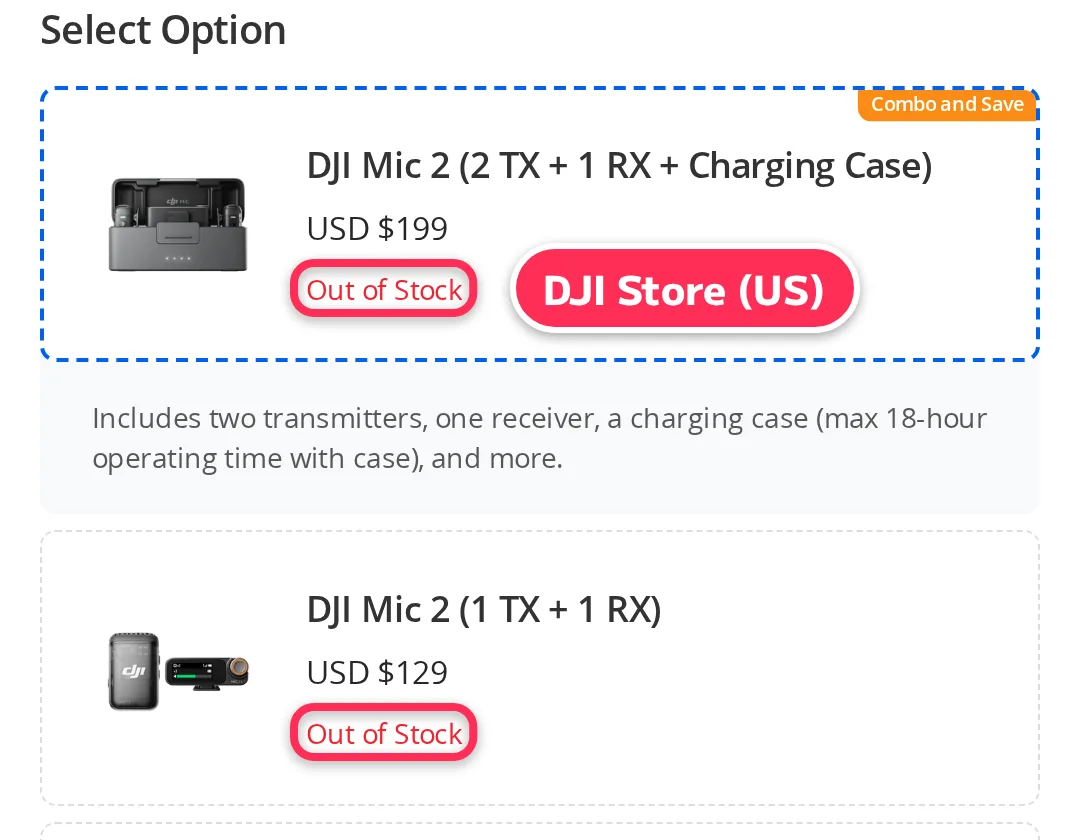
DJI sells the DJI Mic 2 in two sets: two transmitters, one receiver and a charging case, or one transmitter and one receiver (DJI's page and the DJI Store). One receiver works with up to two transmitters (DJI's comparison: "Two transmitters, one receiver").
- Connects to: cameras with the 3.5mm TRS cable. Phones with the USB-C or Lightning adapter (both are in the charging case). Computers over USB-C
- Battery: 6 hours for each transmitter and the receiver. Up to 18 hours with the charging case (in the 2-transmitter set)
- Internal recording: 8 GB in each transmitter, up to 14 hours of 48kHz 24-bit audio. 32-bit float is supported
- Also: intelligent noise cancelling. The transmitter weighs 28 g
- US price: $199 for the 2-transmitter set with case, $129 for 1 transmitter and 1 receiver (DJI Store, US). Every option showed "Out of Stock" (November 4, 2026)
DJI's page also says you can play audio back on your phone without unplugging the receiver. The transmitter can also connect to a phone over Bluetooth and work with third-party video apps. DJI notes that noise cancelling and internal recording are not available in that mode.
DJI also makes the lighter DJI Mic Mini (10 g transmitter, no internal recording) and the newer DJI Mic 3 (up to four transmitters and 32 GB internal recording; DJI notes that four transmitters need extra accessories sold separately). DJI's US comparison shows "From USD $59" for the Mic Mini and "From USD $169" for the Mic 3. On November 4, 2026, the DJI Store (US) showed their options as out of stock, too.
Official page: DJI, "DJI Mic 2" (opens in a new tab) · Buy: DJI Mic 2 on Amazon.com (affiliate link) (opens in a new tab)
RØDE Wireless GO (Gen 3): 32-bit float backup recording
The RØDE Wireless GO II in the old version of this article is now discontinued (RØDE's US page). The newer version is the Wireless GO (Gen 3).
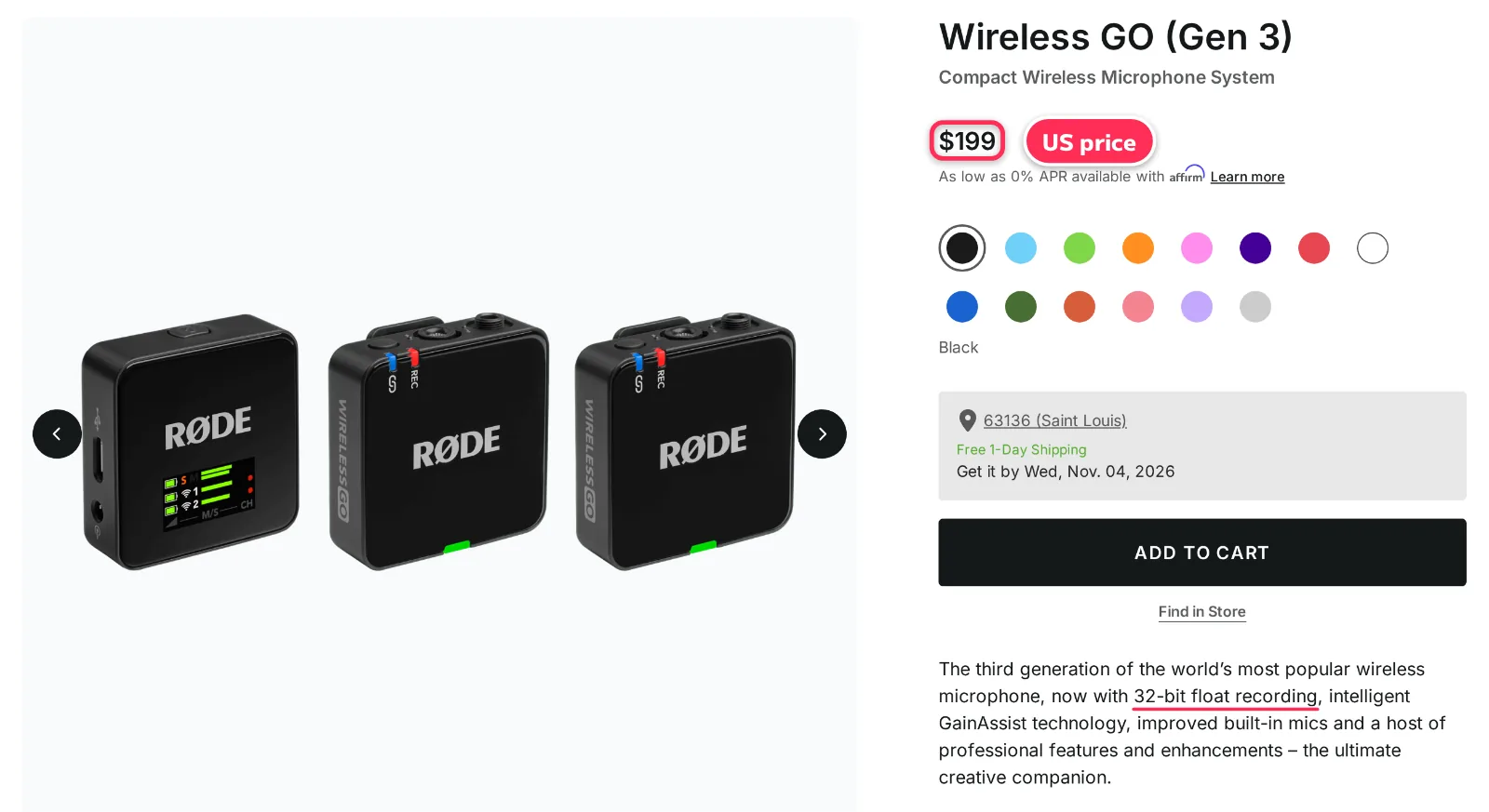
- Connects to: cameras over 3.5mm (the receiver's output is 3.5mm TRRS). Phones and computers over USB-C. A USB-C to Lightning cable is in the box (datasheet)
- Battery: up to 7 hours
- Internal recording: 32 GB in each transmitter, for over 40 hours of backup recording (datasheet). 32-bit float
- Also: GainAssist, which balances levels automatically. Range up to 260 m (line of sight). The transmitter weighs 35 g (datasheet)
- US price: $199 on RØDE's US store (November 4, 2026). The datasheet lists two transmitters and one receiver in the box
With an iPhone, you can skip the receiver. RØDE's page says Direct Connect pairs the transmitters straight to an iOS phone over Bluetooth, using the RØDE Capture app.
Official page: RØDE, "Wireless GO (Gen 3)" (opens in a new tab)
Hollyland Lark M2: a 9 g transmitter
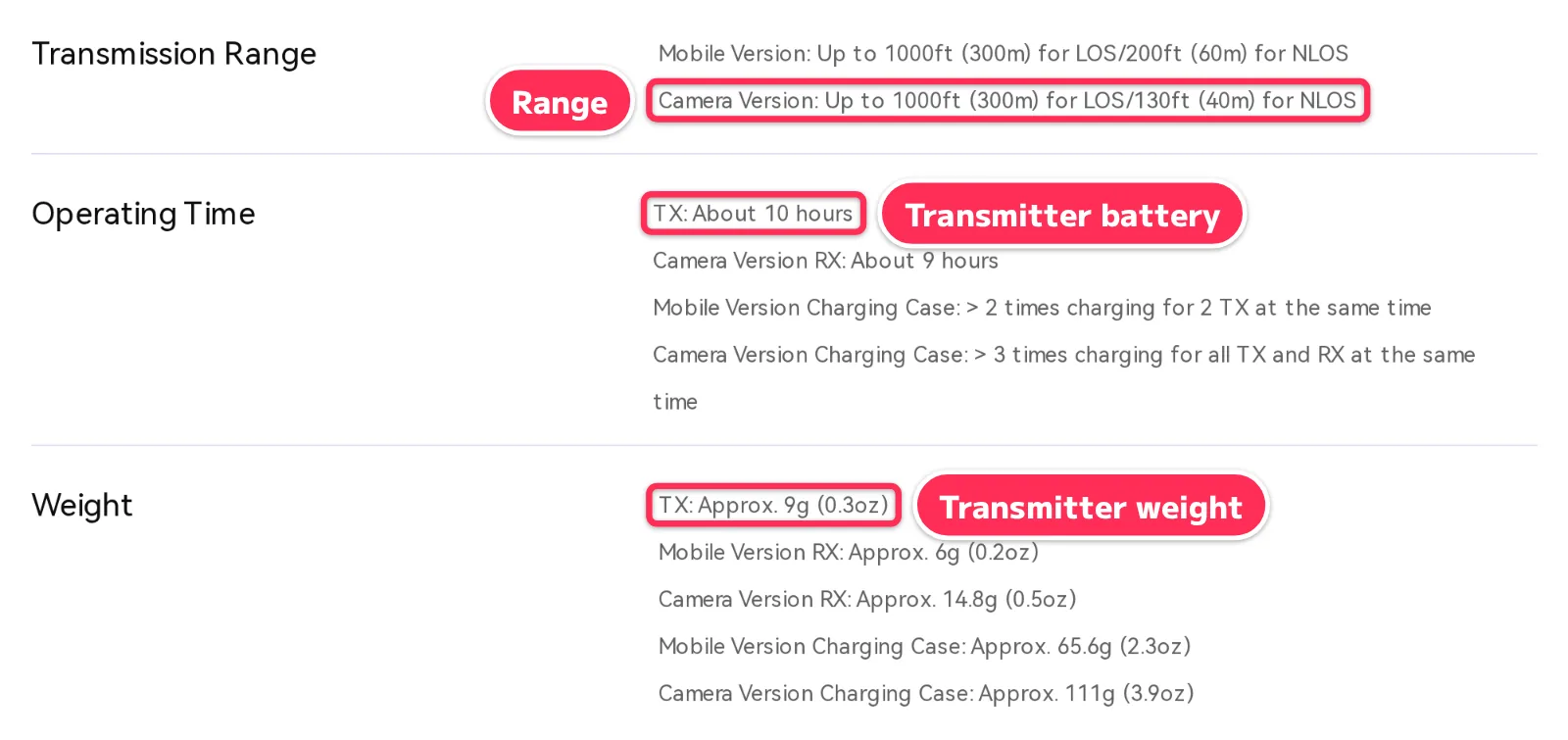
Hollyland lists the Lark M2 transmitter at about 9 g (0.3 oz) (Hollyland's page). It was in the old version of this article, and it is still on sale.
- Connects to: the mobile version's receiver plugs straight into a phone (a Lightning or a USB-C version). For DSLR and mirrorless cameras, Hollyland uses a 3.5mm TRS to TRS cable
- Battery: about 10 hours for the transmitter. About 40 hours in total with the charging case for the camera version, 30 hours for the mobile version
- Range: up to 300 m (1,000 ft) with a clear line of sight. 40 m (camera version) or 60 m (mobile version) without one
- Also: Environmental Noise Cancellation (ENC). 48 kHz, 24-bit audio
- US price: the Combo Version (USB-C receiver, Lightning receiver and charging case) was $99.00 on Hollyland's US store, a sale price shown next to $183.00 (November 4, 2026)
Hollyland sells several versions (Combo, Mini Combo, mobile and camera). What comes in the box depends on the version, so check which receivers you get before you buy.
The old version of this article listed the Lark M2 at 10 hours, 9 g and 300 m. Those numbers match Hollyland's page today.
Official page: Hollyland, "LARK M2" (opens in a new tab) · Buy: Hollyland Lark M2 on Amazon.com (affiliate link) (opens in a new tab)
Wired lavalier mics: 3 picks
These lav mics connect with a cable. They suit one person talking to a phone, or explainers filmed at a desk.
BOYA BY-M1: for cameras and phones, with a 6 m cable
BOYA calls the BY-M1 a "Universal Lavalier Microphone" for cameras, smartphones and other recording devices (BOYA's page).
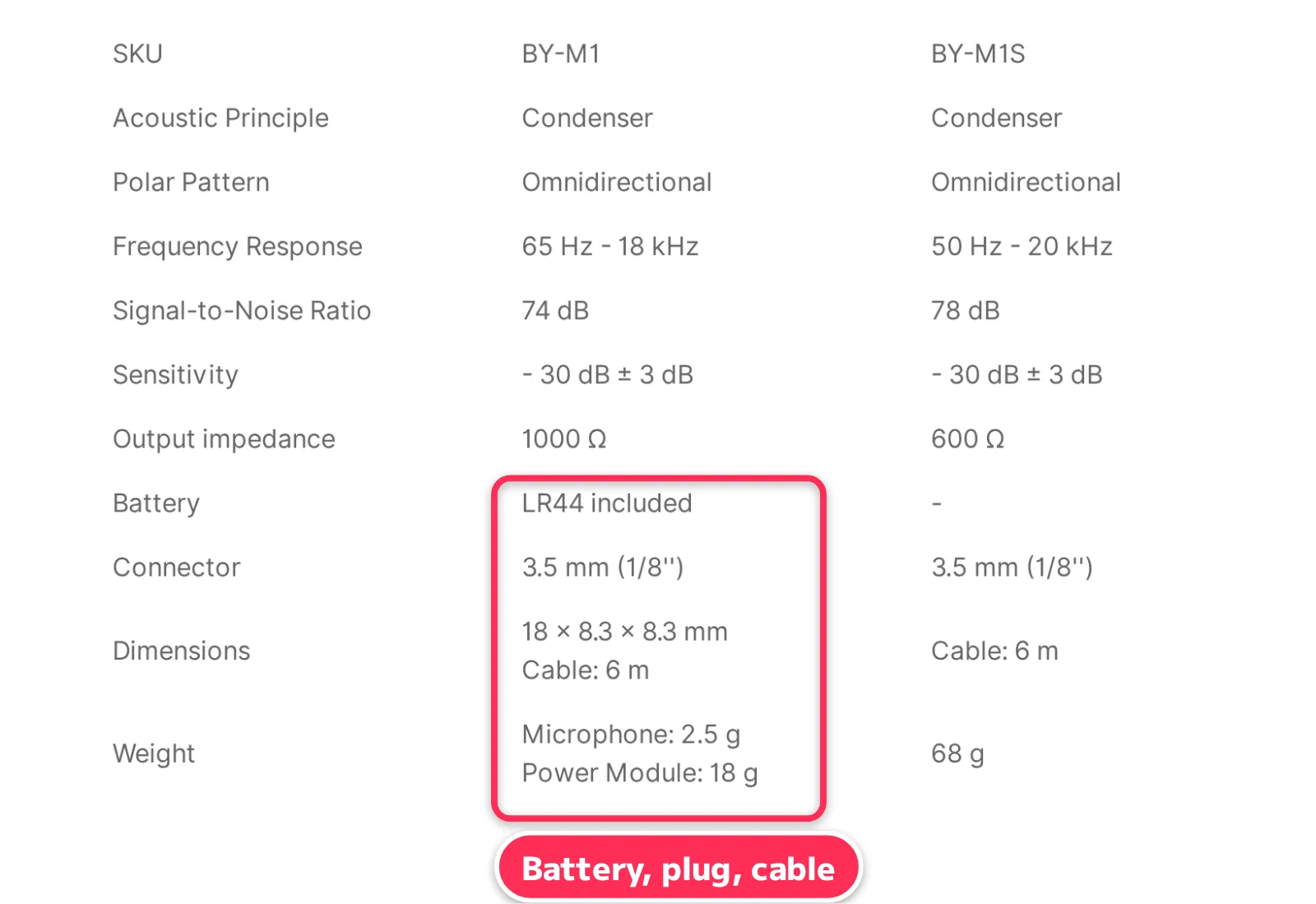
- Connects to: 3.5mm. It has a camera model and a phone model ("Selectable camera and smartphone model")
- Battery: one LR44 button battery (included)
- Cable: 6 m, long enough when the speaker sits away from the camera
- Weight: 2.5 g for the mic, 18 g for the power module
- Price: USD 32.99 on BOYA's official online store (November 4, 2026)
BOYA also makes the BY-M1S, which needs no battery (BOYA's page).
Official page: BOYA, "BY-M1" (opens in a new tab) · Buy: BOYA BY-M1 on Amazon.com (affiliate link) (opens in a new tab)
RØDE smartLav+: plugs straight into a phone's headphone jack
RØDE's smartLav+ is a TRRS lav mic made for smartphones (RØDE's page).
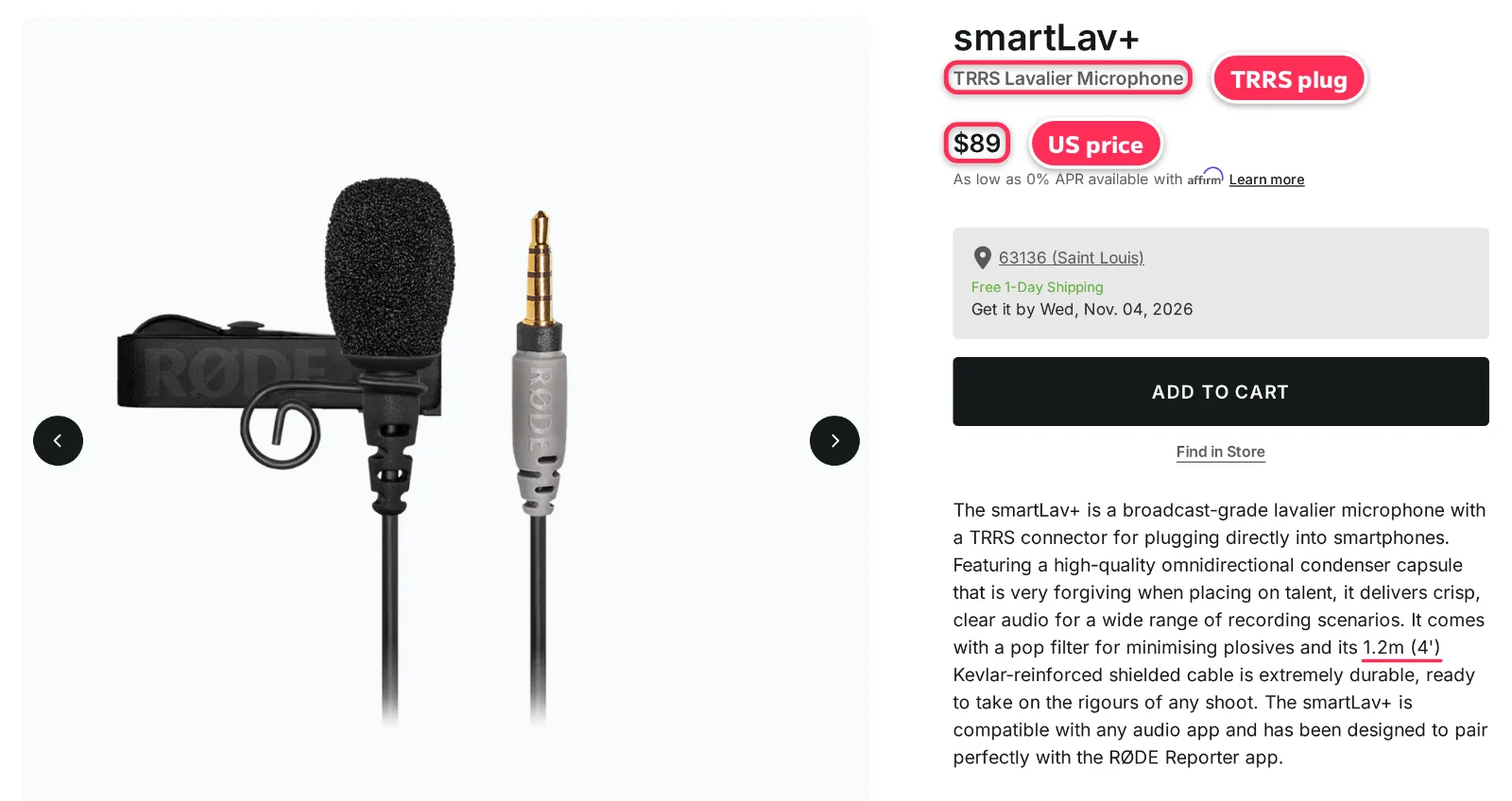
- Connects to: 3.5mm TRRS. It plugs straight into a phone's headphone jack
- Battery: none. RØDE lists the power as "Powered from iPhone TRRS socket (2.7V)"
- Cable: 1.2 m (4 ft), Kevlar-reinforced
- Also: omnidirectional. A pop filter comes with it
- US price: $89 on RØDE's US store (November 4, 2026)
To use it with a camera, RØDE lists the SC3 TRRS to TRS cable. For more length, there is the SC1, a 6 m extension cable (both under "Compatible Accessories" on the same page).
Official page: RØDE, "smartLav+" (opens in a new tab) · Buy: RØDE smartLav+ on Amazon.com (affiliate link) (opens in a new tab)
Shure MVL: for phones and tablets, 8.0 g
Shure's MVL is an omnidirectional lav mic for recording speech on a phone or tablet (Shure's page and user guide).
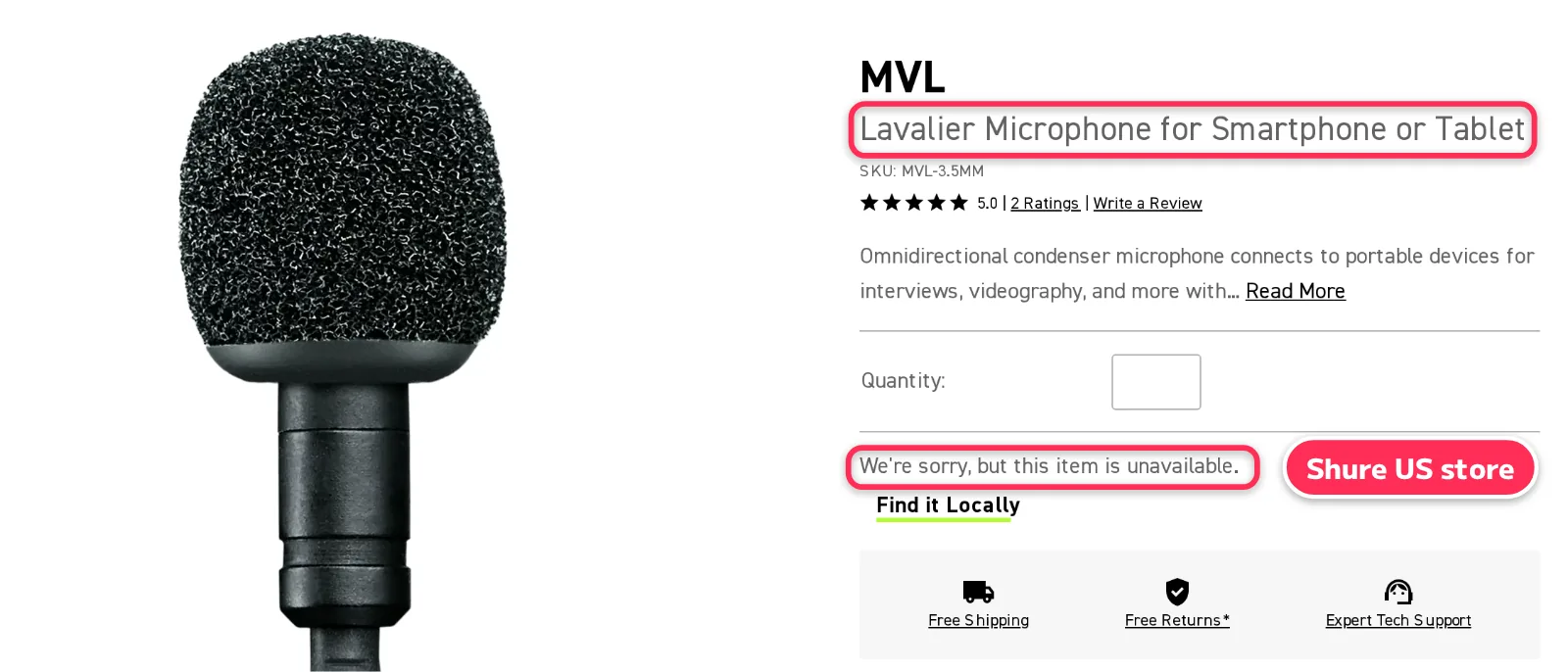
- Connects to: 3.5mm TRRS (model MVL-3.5MM)
- Battery: none. The guide lists a microphone bias of 2.7 V DC, which comes from the phone or tablet
- Weight: 8.0 g with the cable (user guide)
- Also: the guide says the mic "should be 15-25 cm (6-10 in.) away from the mouth"
- US availability: Shure's US store said "We're sorry, but this item is unavailable" and showed a "Find it Locally" link, with no price (November 4, 2026)
Official page: Shure, "MVL" (opens in a new tab) · Buy: Shure MVL on Amazon.com (affiliate link) (opens in a new tab)
Lav mic with a built-in recorder: TASCAM DR-10L Pro
The TASCAM DR-10L in the old version of this article "has been discontinued in North, Central and South America", and TASCAM says it "has been replaced with the DR-10L Pro" (TASCAM's US page). The DR-10L Pro records in 32-bit float.
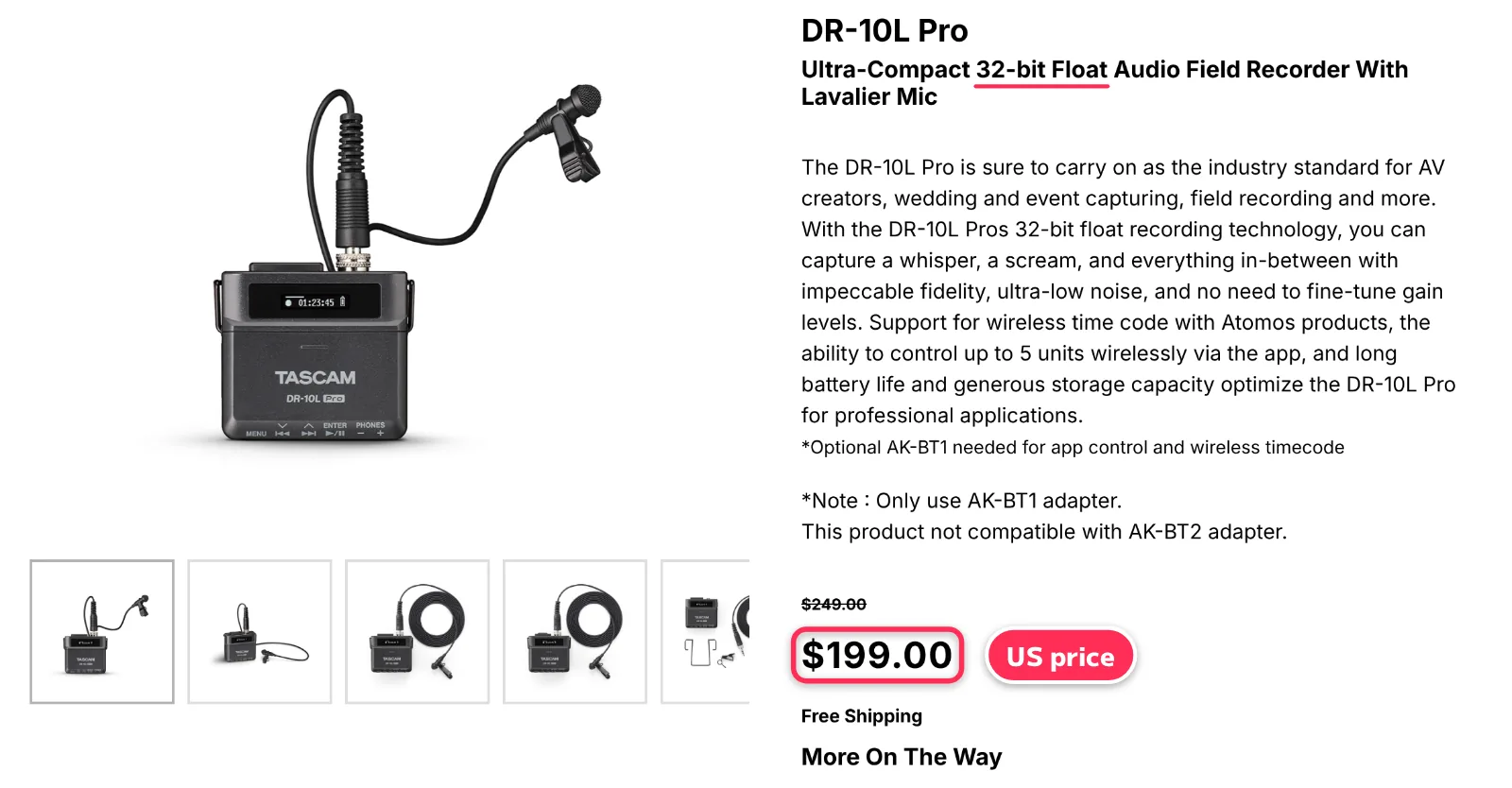
- How it works: clip the included TM-10L lav mic (160 cm cable) to the speaker, and the small recorder to a belt. The audio goes to a microSDXC card (up to 512 GB)
- Battery: up to 24.5 hours on two AAA batteries (lithium)
- Weight: 65 g
- Also: it saves the file about every 20 seconds while recording. App control and wireless timecode need the optional AK-BT1 Bluetooth adapter
- US price: $199.00 on TASCAM's US store, shown next to $249.00 (November 4, 2026)
- US stock: TASCAM's US store showed it as "More On The Way" (out of stock) (November 4, 2026)
It doesn't connect to the camera, so you need to line up the audio and video in editing. In return, it keeps recording where no wireless signal reaches, and through a long ceremony.
Official page: TASCAM, "DR-10L Pro" (opens in a new tab)
What we dropped from the old list, and why
We checked all 15 mics from the old version on official pages (November 4, 2026). We kept 7 (2 of them replaced by newer versions) and removed 8.
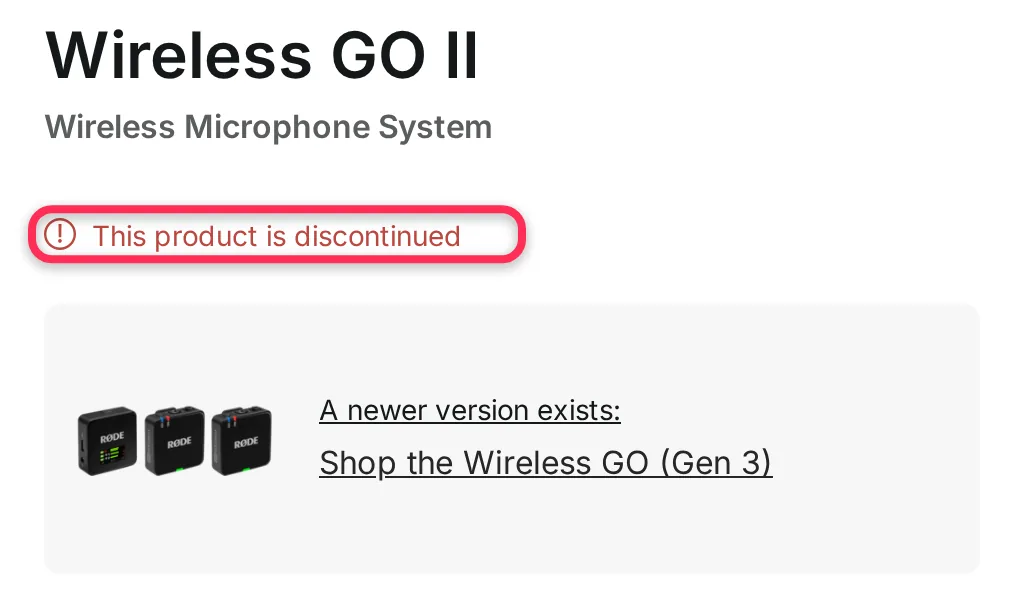
RØDE Wireless GO II
RØDE (US), “Wireless GO II” (November 4, 2026) 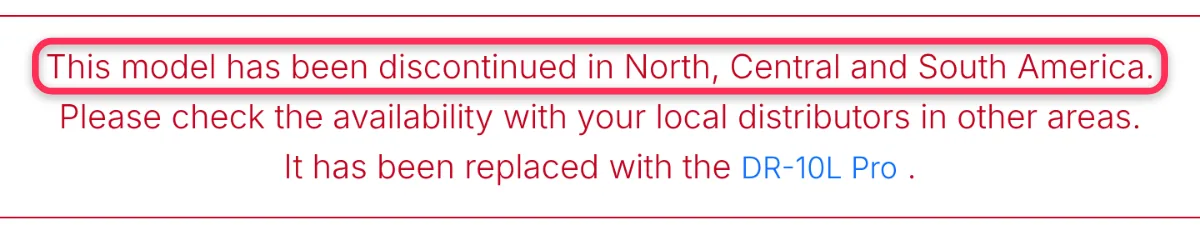
TASCAM DR-10L
TASCAM (US), “DR-10L” (November 4, 2026) 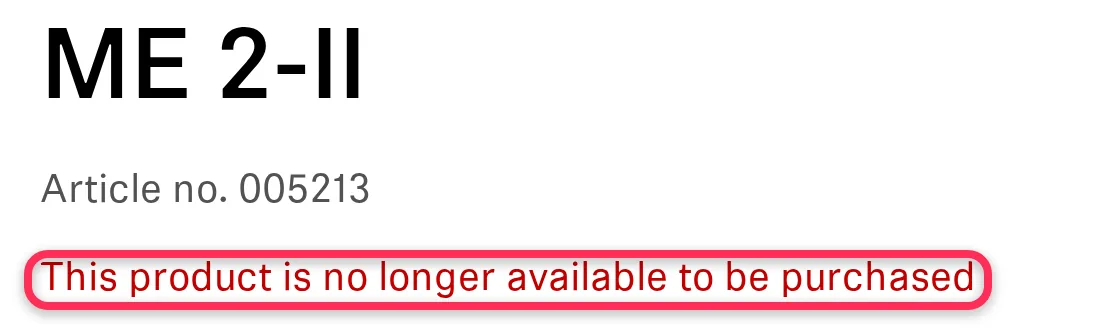
Sennheiser ME 2-II
Sennheiser (US), “ME 2-II” (November 4, 2026) 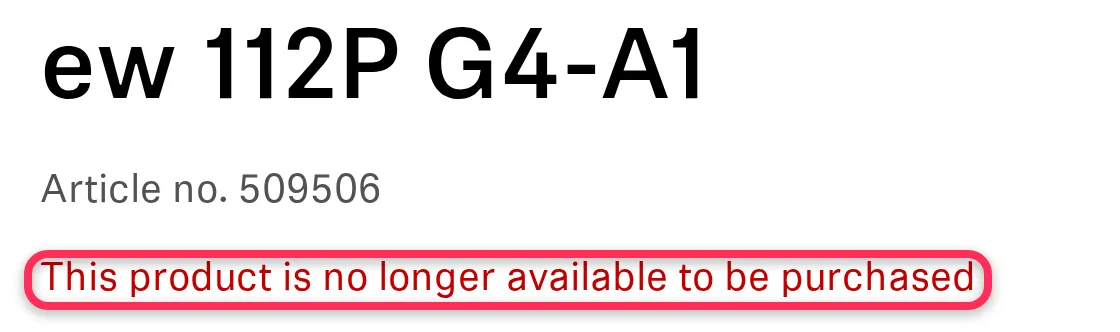
Sennheiser EW 112P G4
Sennheiser (US), “ew 112P G4” (November 4, 2026)
| Mic | What we did, and why (November 4, 2026) |
|---|---|
| RØDE Wireless GO II | Replaced with the Gen 3. RØDE's US page says "This product is discontinued" |
| TASCAM DR-10L | Replaced with the DR-10L Pro. TASCAM's US page says it is discontinued in North, Central and South America |
| Sennheiser ME 2-II · EW 112P G4 | Removed. Sennheiser's US pages say "This product is no longer available to be purchased" |
| Sony ECM-LV1 | Removed. Sony's Japanese page lists it as discontinued, and Sony's US pages could not be checked |
| Sony ECM-77B | Removed. Sony's Japanese page lists it as no longer sold and points to the ECM-77B/9X as its successor. Sony's US pages could not be checked |
| Sony UWP-D21 | Removed from this English version. Sony's Japanese page lists a B-band (806–810 MHz) version for Japan, and we could not open Sony's US product pages to check the US version |
| Comica BoomX-D2 | Removed to keep the list short (our editorial choice; Comica's official BoomX-D page exists) |
| AGPTEK clip-on mic · BILIWAL wireless mic | Removed. We could not find official product pages, so we could not check the specs |
The old version also had mix-ups. Under three of the headings, the text described different mics: the RØDE Lavalier GO under "Sony ECM-LV1", the Movo LV1 under "AGPTEK", and a "Mini Mic Pro" under "BILIWAL".
Some numbers did not match the official pages, either. For example, the old version gave the DJI Mic 2 a 5-hour battery and 30 g. DJI's spec page says 6 hours and 28 g. It gave the BOYA BY-M1 58 g. BOYA lists 2.5 g for the mic and 18 g for the power module.
This version uses only the numbers we could confirm on official pages.
How to wear a lavalier mic
Even a good lav mic sounds very different depending on how you wear it. Here are the four basics.
15–25 cm (6–10 in.) from the mouth
Mid-chest, on the shirt placket or collar (placement: our editorial view)
Keep the mic head clear
No fabric, hair or beard over it
Run the cable inside
Clip a small loop to absorb tugs
Use a windscreen outside
The one in the box
1. Position: Shure's MVL guide says the mic "should be 15-25 cm (6-10 in.) away from the mouth". The middle of the chest is a good place to start (our editorial view). If the speaker often turns their head to one side, move the mic toward that side (our editorial view).
2. Keep it clear: when the mic head rubs against a jacket or hair, you get a rustling sound. Find a spot where fabric won't touch it when the speaker moves (our editorial view).
3. Cable: for a wired lav mic, or the mic on a transmitter, run the cable inside the clothing so it looks tidy on screen. Make a small loop under the clip and hold it in place. Then a tug on the cable reaches the mic less (our editorial view).
4. Windscreen: outdoors, wind on the mic makes a booming sound. DJI's page suggests "adding the windscreen to effectively reduce wind noise in windy or fast-moving scenarios". For stronger wind, Shure's guide points to the optional Rycote Mini Windjammer, which fits over the included foam windscreen.
You can also hide the mic under clothing. But fabric noise is more likely there, so we suggest wearing it on the outside until you are used to it (our editorial view).
5 checks before you record
Before the real take, record 30 seconds as a test and listen on headphones. Check these five things (our editorial view).
- Is there sound?
Does the level meter on the phone or camera move? A TRS/TRRS mix-up shows up here - Is it too loud?
Speak at your loudest. Does the meter hit the top? Distorted audio often cannot be fixed later - Any rustling?
Move around as you talk. Do you hear fabric noise? - Battery and space
Do the transmitter, receiver or recorder have enough charge? Is there enough space on the card or phone? - Camera mic settings
Is the camera set to the external mic, with a sensible recording level?
After the shoot, keep the audio and video files in two places. We compared free storage for video files in "Best free cloud storage for videos".
Clean audio also makes automatic subtitles more accurate (our editorial view). For turning speech into captions, see "3 effective methods to transcribe videos".
No time to record a voice? Try AI narration
Recording with a lav mic takes gear, a quiet room and a few retakes.
For company explainers and ads, you can also skip the recording and use AI narration (an AI voice that reads your script). When you change the script, you can make the voice again right away.
On OurTime's AI video page, the estimate for each sample video lists "Concept", "AI footage", "Editing & captions" and "Music & narration". Our production steps also say OurTime handles editing and on-screen text, "along with narration and sound" (AI video page).
A training video OurTime made with AI (sample)
3 tips for AI prompts
Education & training · 60s · estimate $500–800
Title, length and estimate as shown on our AI video page (November 4, 2026). The estimate gives 3–5 days to the first draft, and your quote confirms the price and schedule. The on-screen text of this sample is in Japanese
This sample is "a one-minute explainer on three tips for clearer AI prompts" (our AI video page).
You can also split the work: use a lav mic for videos where you speak in your own voice, and AI narration for explainers and ads (our editorial view).
Frequently asked questions
What is a lavalier mic?
A small mic you clip to the speaker's clothing, near the chest. Because it records close to the mouth, the voice level stays steady even when the speaker moves. People also call it a lav mic, a lapel mic or a clip-on mic.
Can I use a lavalier mic with an iPhone?
Yes. An iPhone without a headphone jack connects through its USB-C or Lightning port, so a wired 3.5mm lav mic needs an adapter. For wireless sets, the DJI Mic 2 charging case has USB-C and Lightning adapters, the RØDE Wireless GO (Gen 3) comes with a USB-C to Lightning cable, and Hollyland sells the Lark M2 with a Lightning or a USB-C receiver (official pages).
Wired or wireless: which is better?
For one person sitting and talking to a phone, wired is often enough. If the speaker moves, stands away from the camera, or two people talk, wireless works better (our editorial view).
What should I buy for a two-person video?
A wireless set with two transmitters. The DJI Mic 2, RØDE Wireless GO (Gen 3) and Hollyland Lark M2 in this article all come in sets with two transmitters. What is in the box differs by set, so check the official page before you buy.
Are cheap lavalier mics OK?
Wired lav mics usually cost less than wireless sets. More than the price, first check that the plug matches what you connect to (TRS, TRRS or USB-C). Picking a mic whose specs you can check on an official page is the safe choice (our editorial view).
What are internal recording and 32-bit float?
Internal recording means the transmitter keeps its own copy of the audio. If the wireless signal drops, you can use that copy later. 32-bit float is a recording format that lets you turn the audio up or down afterwards without ruining it (RØDE's and TASCAM's pages).
Why does my lav mic make rustling sounds?
Usually clothing or hair is rubbing against the mic head. Move the mic, and clip a small loop of cable inside the clothing. Outdoors, put the windscreen on (our editorial view).
Lavalier or shotgun mic for interviews?
For a seated interview where you don't want a mic in the shot, a lav mic keeps the voice close and steady. A shotgun mic on the camera is quicker to set up, but the sound changes as the speaker moves away from it (our editorial view).
Can I make a video without recording a voice?
Yes. You can use AI narration, an AI voice that reads your script. On OurTime's AI video page, the estimate for each sample includes music and narration.
Summary
Check the plug first
TRS · TRRS · USB-C
Moving? Go wireless
Two people: two transmitters
15–25 cm (6–10 in.) from the mouth
Test before you record
Choose a lav mic by what you plug it into and whether you need a cable.
For one person and a phone, go with a wired TRRS mic (BOYA BY-M1, RØDE smartLav+ or Shure MVL). For a camera or two people, choose a wireless set with two transmitters (DJI Mic 2, RØDE Wireless GO (Gen 3) or Hollyland Lark M2). To record far from the camera or for a long time, use the TASCAM DR-10L Pro.
In the US, check stock first: on November 4, 2026, DJI's US store showed the DJI Mic 2 as out of stock, Shure's US store showed the MVL as unavailable, and TASCAM's US store showed the DR-10L Pro as "More On The Way" (out of stock).
Wear the mic mid-chest, 15–25 cm (6–10 in.) from the mouth, with a small loop of cable clipped inside the clothing. Before the real take, record 30 seconds and listen.
When there is no time to record a voice, AI narration is another way.
Our own service (OurTime)
Tell us the video you want, in one line
We make company, product, recruiting and ad videos with AI, and narration can be part of the edit. We'll send back a proposed outline and quote.
AI videos: $500+. First draft from 3 days, after scope and materials are confirmed.
Related articles:
Sources (checked November 4, 2026)
- DJI, "DJI Mic 2 (opens in a new tab)" (USB-C and Lightning adapters in the case, 6 and 18 hours, 8 GB and 14 hours, 32-bit float, playback, Bluetooth notes, windscreen, the 2 sets, the US comparison price) and "DJI Mic 2 Specs (opens in a new tab)" (28 g, 6 hours, 250 m FCC and 160 m CE); DJI Store (US), "DJI Mic 2 (opens in a new tab)" ($199 and $129, out of stock), "DJI Mic 3 (opens in a new tab)" and "DJI Mic Mini (opens in a new tab)" (out of stock)
- DJI, "DJI Mic 3 (opens in a new tab)" (DJI Mic Series Comparison: transmitter weights, internal recording, connection capability, US "From" prices)
- RØDE (US), "Wireless GO (Gen 3) (opens in a new tab)" ($199, 32-bit float, GainAssist, Direct Connect, 260 m, up to 7 hours) and the Wireless GO (Gen 3) datasheet (opens in a new tab) (35 g, 32 GB and over 40 hours, what's in the box)
- RØDE (US), "Wireless GO II (opens in a new tab)" (discontinued) and "smartLav+ (opens in a new tab)" ($89, TRRS, 1.2 m, power, compatible accessories)
- Hollyland, "LARK M2 (opens in a new tab)" (9 g, 10 hours, 40 and 30 hours with case, 300 m, versions, ENC); Hollyland Store (US), "LARK M2 (opens in a new tab)" (Combo Version $99.00, shown with $183.00)
- BOYA, "BY-M1 (opens in a new tab)" (SPECs, camera and smartphone models, BY-M1S); BOYA Store, "BY-M1 (opens in a new tab)" (Classic Version USD 32.99)
- Shure (US), "MVL (opens in a new tab)" (unavailable in the US store) and the "MVL user guide (opens in a new tab)" (TRRS, 2.7 V bias, 8.0 g, 15–25 cm, Rycote Mini Windjammer)
- TASCAM (US), "DR-10L Pro (opens in a new tab)" ($199.00, "More On The Way", 32-bit float, 24.5 hours, 65 g, 20-second saves, TM-10L 160 cm, 512 GB, AK-BT1) and "DR-10L (opens in a new tab)" (discontinued in the Americas)
- Sennheiser (US), "ME 2-II (opens in a new tab)" and "ew 112P G4 (opens in a new tab)" (no longer available to be purchased)
- Sony (Japan), "ECM-LV1 (opens in a new tab)" (discontinued), "ECM-77B (opens in a new tab)" (no longer sold, successor ECM-77B/9X) and "UWP-D21 (opens in a new tab)" with its spec sheet (PDF) (opens in a new tab) (B-band version for Japan, 806.125–809.750 MHz)
- Comica, "BoomX-D (opens in a new tab)"
- OurTime, "AI Videos | From $500" (price and first draft, what the estimate includes, the production steps, the sample "3 tips for AI prompts" and its estimate)